Prompt Engineering 101: Create your very first AI prompt
 Evert Hoff
Most people are using AI like a search engine. That’s not where the real power is.
The real shift happens when you stop chatting to AI... and start creating reusable prompts.
A prompt is essentially a reusable instruction file for an LLM like ChatGPT.
Instead of typing the same instructions over and over again, you create the instructions once, save them, and reuse them whenever needed.
Here’s a simple example.
Imagine you want a “joke of the day” for your development team.
You could type this into ChatGPT (or similar LLM):
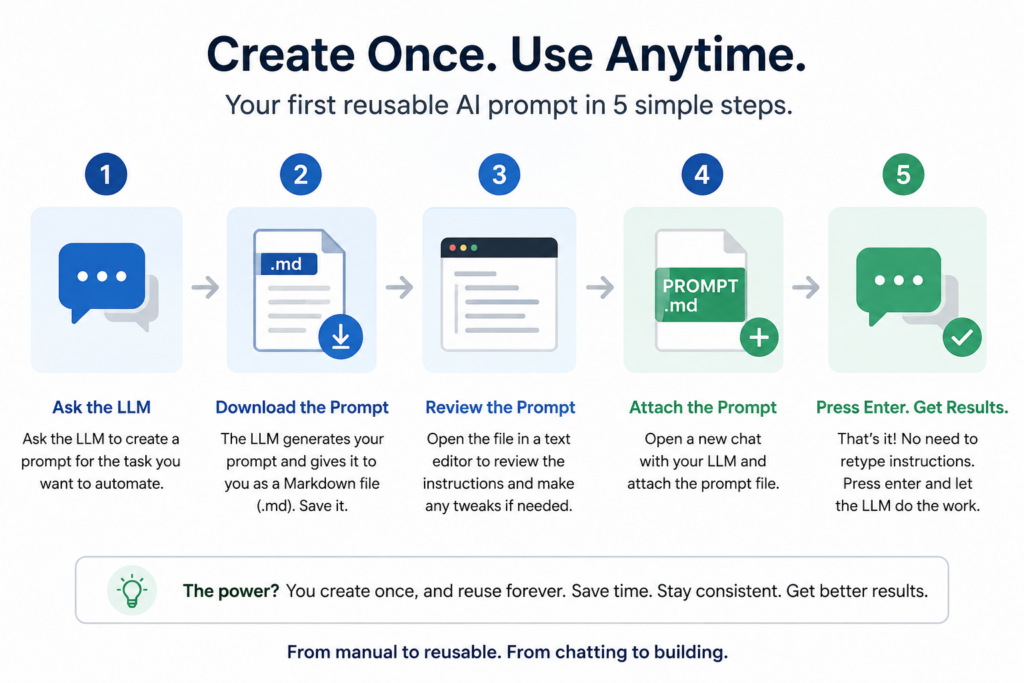
Create an LLM prompt that will generate a joke of the day for my software development team working on Guidewire at Santam Insurance. The jokes must be clean, unique, and suitable for work. Give me the prompt as a downloadable Markdown file.
The AI then generates a reusable prompt file, e.g. "daily-joke-prompt.md".
If you open that file in a text editor you might see something like:
dialy-joke-prompt.md
# Joke of the Day Prompt for Guidewire Development Team

You are a professional workplace humor writer creating a **“Joke of the Day”** for a software development team working on Guidewire at Santam Insurance.

## Requirements

Generate exactly **1 original joke** per response.

The joke must be:

- Clean and safe for work
- Suitable for a professional corporate environment
- Funny for software developers, analysts, testers, architects, Scrum Masters, and Guidewire specialists
- Relevant to:
  - Software development
  - Enterprise systems
  - Agile/Scrum
  - Insurance industry concepts
  - Guidewire development
  - Integrations
  - Production support
  - APIs
  - Deployments
  - Bugs
  - Requirements changes
  - Testing/UAT
  - CI/CD
  - Jira
  - Meetings
  - Legacy systems
  - Developers vs business users
- Light-hearted and positive
- Short enough to post in Microsoft Teams, Slack, or email

## Important Rules

- The joke must be unique every time
- Do not repeat common programmer jokes
- Avoid offensive, political, religious, or inappropriate humor
- Avoid sarcasm aimed at specific people or job roles
- Avoid jokes that insult customers, management, or colleagues
- Avoid profanity
- Do not mention OpenAI or being an AI
- Do not explain the joke
- Do not include introductory text like “Here’s your joke”
- Do not use emojis unless naturally appropriate and minimal

## Preferred Style

The best jokes:
- Sound like something developers would actually say
- Contain a clever twist
- Reference realistic enterprise development situations
- Feel modern and relatable
- Occasionally include Guidewire terminology naturally

## Output Format

Return only:

1. A short title
2. The joke

Format exactly like this:

### <Funny Title>

<Joke text>

## Examples of Tone (Do Not Reuse)

### Deployment Confidence

“Our Guidewire deployment was so successful that production only went down in environments we didn’t know existed.”

### Requirement Stability

“The business said the requirements were final. That was my first bug of the sprint.”

### Integration Testing

“The integration worked perfectly in QA. Naturally, production had different opinions.”
Your prompt might look different, but it should still do the same thing.
From that point on:
→ Open a new chat
→ Attach the prompt file
→ Press Enter
That’s it.
No retyping.
No repeated context.
No explaining the task again.
You’ve effectively created a tiny software component powered by English instead of code.
And this is where things start getting interesting.
Because prompts can also:
- Accept attachments
- Analyse documents
- Transform data
- Generate reports
- Review code
- Create LinkedIn posts
- Assist business processes
We’re slowly moving from:
“using AI manually”
to
“building reusable AI capabilities”.
That’s a much bigger shift than most people realise.
I suspect prompt libraries will eventually become as normal inside companies as Excel templates and PowerPoint decks.
Join our newsletter for more tips like these.